ALL PROJECTS/DOCUMENT MANAGEMENT SYSTEM

Overview

A freelance client was doing the same clerical work over and over: the same personnel details, held in a spreadsheet, typed by hand into the same government PDFs. Every form wanted the same handful of facts, and every form asked for them in its own wording and its own order.

The brief was a small internal tool that closes that loop: keep the records where they already are, let someone pick the person they need, and hand back the form with the mapped fields already entered.

What makes it more than a mail merge is the shape of the target. A government fillable PDF is not a template with tidy placeholders — it is a form whose fields were named by whoever built it, for a person reading a screen. The interesting decision in this project is how the tool bridges that gap without asking anyone to transcribe a field map, and where it honestly stops.

Problem

Three things stood between a spreadsheet row and a filled form.

The form's field names are written for humans. A fillable PDF stores a name for every field, and those names are written the way a person writes a label — mixed capitalisation, the occasional space, wording that never lines up with the spreadsheet's own headers. Matching a data key to a field by exact equality means writing out every one of those names by hand, per form, and doing it again the moment a form is revised.

The spreadsheet is not the tool's to own. The records already lived in a workbook that people opened and edited themselves. A tool that imported them into its own database would have created a second copy that immediately starts drifting from the first, so the workbook had to stay the system of record — read from and written back to, rather than imported.

Not every PDF can be filled. Of the five documents in scope, one carries no form fields at all — it is a flat document, not a fillable form. No amount of field matching reaches it. That is a hard boundary of the approach, and it is the kind of thing that is only discovered by opening the files rather than assuming they are all alike.

System Design

How It Works

01/04
01

A record is entered

How a new person reaches the sheet without the tool taking ownership of it.

  1. 1Twenty-six fields are filled in, laid out in a three-column grid
  2. 2The whole form is submitted as one batch rather than field by field
  3. 3The new row is added to the records already in the workbook
  4. 4The sheet is written back, so the spreadsheet gains the record

02

A record is found

Why the identifier is a choice rather than something hard-coded.

  1. 1A column is chosen to identify people by
  2. 2A value is chosen from that column's own distinct entries
  3. 3The sheet is narrowed to the rows matching that value
  4. 4Those rows are what the export below reads, taking the first of them
03

A form gets filled

The core of the tool — reading the form's own wording instead of a transcribed map.

  1. 1Every field on the chosen document is walked in turn and its name read
  2. 2The name is normalised: parentheticals dropped, spaces removed, case folded
  3. 3Each data key is normalised the same way and tested for containment
  4. 4The first key that matches writes its value into the field, and the walk moves on
04

The file reaches the person

What leaves the tool, and what it deliberately leaves behind.

  1. 1The populated document is assembled in an in-memory buffer
  2. 2Export is confirmed, and the finished file is offered as a download
  3. 3The part-filled document is what leaves the machine
  4. 4No filled copy of it is written to disk by the tool

Key Features

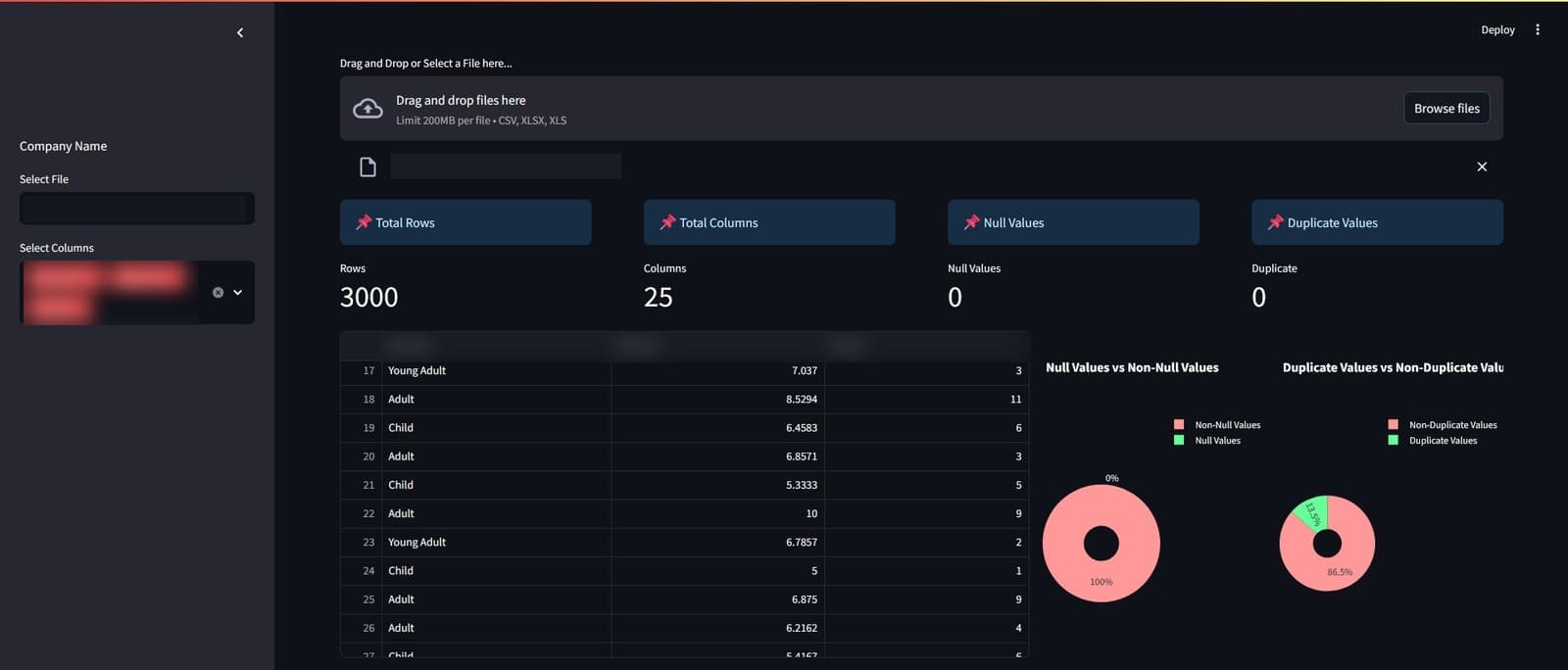
  • A two-tab workflow that separates entering records from exporting documents
  • A twenty-six-field record form, laid out in a three-column grid and submitted as a single batch
  • New records written back into the spreadsheet, which stays the system of record
  • A canonical column list held in code, so the record shape is declared in one place rather than inferred from the sheet
  • Filter by any column — choose the identifying column, then a value from that column's own entries
  • Field matching by normalised containment: parentheticals dropped, spaces removed, case folded
  • Five documents in the export picker, with the four not yet implemented visibly disabled rather than hidden
  • The document assembled in memory and handed straight to the browser as a download

Outcomes

  • Removed the transcription step from the mapping — the tool reads the form's own field names and matches them by normalisation, so no exact field map has to be written or maintained per form
  • Kept the client's spreadsheet as the single copy of the records, writing back to it rather than importing it into a store that would immediately start drifting
  • Delivered the fill path end to end for the wired document — pick a person, get that document back with its mapped fields already entered and the rest still blank — with no filled copy written to disk along the way
  • Surveyed the five documents before committing to the technique — one carries no form fields at all, so field matching can never reach it; in the tool it sits disabled alongside the three that are simply not built yet
  • Left the remaining scope legible — the unimplemented documents disabled in plain sight, and fourteen further keys sketched in place and commented rather than deleted
  • Shipped as a self-contained local tool: one command to start, nothing to host, no database to stand up and no deployment step

More work